library(bixverse)
library(ggplot2)
library(data.table)
#>
#> Attaching package: 'data.table'
#> The following object is masked from 'package:base':
#>
#>     %notin%
library(bixverse.plots)
library(magrittr)
Analysing PBMCs with bixverse
2026-09-24
Intro
This vignette walks through a standard single cell analysis on the PBMC3k data set using bixverse. If you have not read the design choices and the introductory vignette, please do so first; this vignette assumes familiarity with how the SingleCells class, on-disk storage and cells-to-keep logic work.
Loading the data
We start by downloading the PBMC3k data set bundled with the package and loading it via Cell Ranger-style MTX I/O.
pbmc3k_path <- download_pbmc3k()

tempdir_pbmc <- tempdir()

sc_object <- SingleCells(dir_data = tempdir_pbmc)

mtx_io_params <- get_cell_ranger_params(pbmc3k_path)

sc_object <- load_mtx(
  object = sc_object,
  sc_mtx_io_param = mtx_io_params,
  mtx_streaming = FALSE,
  .verbose = TRUE
)
#>  Using light streaming for the CSR to CSC conversion.
#> Loading observations data from flat file into the DuckDB.
#> Loading variable data from flat file into the DuckDB.

sc_object
#> Single cell experiment (Single Cells).
#>   No cells (original): 2700
#>    To keep n: 2700
#>   No genes: 11139
#>   HVG calculated: FALSE
#>   PCA calculated: FALSE
#>   Other embeddings: none
#>   KNN generated: FALSE
#>   SNN generated: FALSE
#>   MAGIC imputed: none
#>   Residual model: none
#>   Stale artefacts: none
Let’s have a quick look at the variable table. The column names from the MTX files are not always informative, so we rename the gene symbol column to something sensible and set up mappings between Ensembl IDs and symbols.
var <- get_sc_var(sc_object)

head(var)
#>    gene_idx         gene_id   column1 no_cells_exp
#>       <num>          <char>    <char>        <int>
#> 1:        1 ENSG00000225880 LINC00115           18
#> 2:        2 ENSG00000188976     NOC2L          258
#> 3:        3 ENSG00000188290      HES4          145
#> 4:        4 ENSG00000187608     ISG15         1206
#> 5:        5 ENSG00000131591  C1orf159           24
#> 6:        6 ENSG00000186891  TNFRSF18           92

setnames_sc(
  object = sc_object,
  table = "var",
  old = "column1",
  new = "gene_symbol"
)

var <- get_sc_var(sc_object)

ensembl_to_symbol <- setNames(var$gene_symbol, var$gene_id)
symbol_to_ensembl <- setNames(var$gene_id, var$gene_symbol)
Quality control
Gene set proportions
A typical first step is computing the proportion of counts mapping to mitochondrial and ribosomal genes per cell. These are added directly to the obs table in the DuckDB.
gs_of_interest <- list(
  MT = var[grepl("^MT-", gene_symbol), gene_id],
  Ribo = var[grepl("^RPS|^RPL", gene_symbol), gene_id]
)

sc_object <- gene_set_proportions_sc(
  sc_object,
  gs_of_interest,
  streaming = FALSE,
  .verbose = TRUE
)

head(sc_object)
#>    cell_idx          cell_id   nnz lib_size to_keep          MT      Ribo
#>       <num>           <char> <num>    <num>  <lgcl>       <num>     <num>
#> 1:        1 AAACATACAACCAC-1   778     2418    TRUE 0.030190241 0.4371381
#> 2:        2 AAACATTGAGCTAC-1  1346     4896    TRUE 0.037990198 0.4246323
#> 3:        3 AAACATTGATCAGC-1  1126     3144    TRUE 0.008905852 0.3171120
#> 4:        4 AAACCGTGCTTCCG-1   953     2632    TRUE 0.017477203 0.2431611
#> 5:        5 AAACCGTGTATGCG-1   520      979    TRUE 0.012257406 0.1491318
#> 6:        6 AAACGCACTGGTAC-1   779     2154    TRUE 0.016713092 0.3635097
As we can see we now have MT and Ribo as columns in the obs table.
MAD outlier detection
We use per-cell QC metrics and MAD-based outlier detection to flag problematic cells. The run_cell_qc function returns a CellQc object that carries the metrics, per-metric outlier calls and a combined outlier vector.
qc_df <- sc_object[[c("cell_id", "lib_size", "nnz", "MT")]]

metrics <- list(
  log10_lib_size = log10(qc_df$lib_size),
  log10_nnz = log10(qc_df$nnz),
  MT = qc_df$MT
)

directions <- c(
  log10_lib_size = "twosided",
  log10_nnz = "twosided",
  MT = "above"
)

qc <- run_cell_qc(
  metrics = metrics,
  cells_to_keep = get_cells_to_keep(sc_object),
  directions = directions,
  threshold = 3
)

qc
#> CellQc: 2700 cells, 537 outliers (19.9%)
#> Metrics:
#>   - log10_lib_size: 336 outliers (mad = 336)
#>     MAD lower = 3.05, upper = 3.64
#>   - log10_nnz: 383 outliers (mad = 383)
#>     MAD lower = 2.70, upper = 3.12
#>   - MT: 201 outliers (mad = 201)
#>     MAD upper = 0.04
The CellQc class has a few associated plotting functions using the output of run_cell_qc and the specified metrics as input
-
violin_plot_scmethod that produces violin plots with outliers highlighted.
plots <- violin_plot_sc(qc)

plots$log10_lib_size + plots$log10_nnz + plots$MT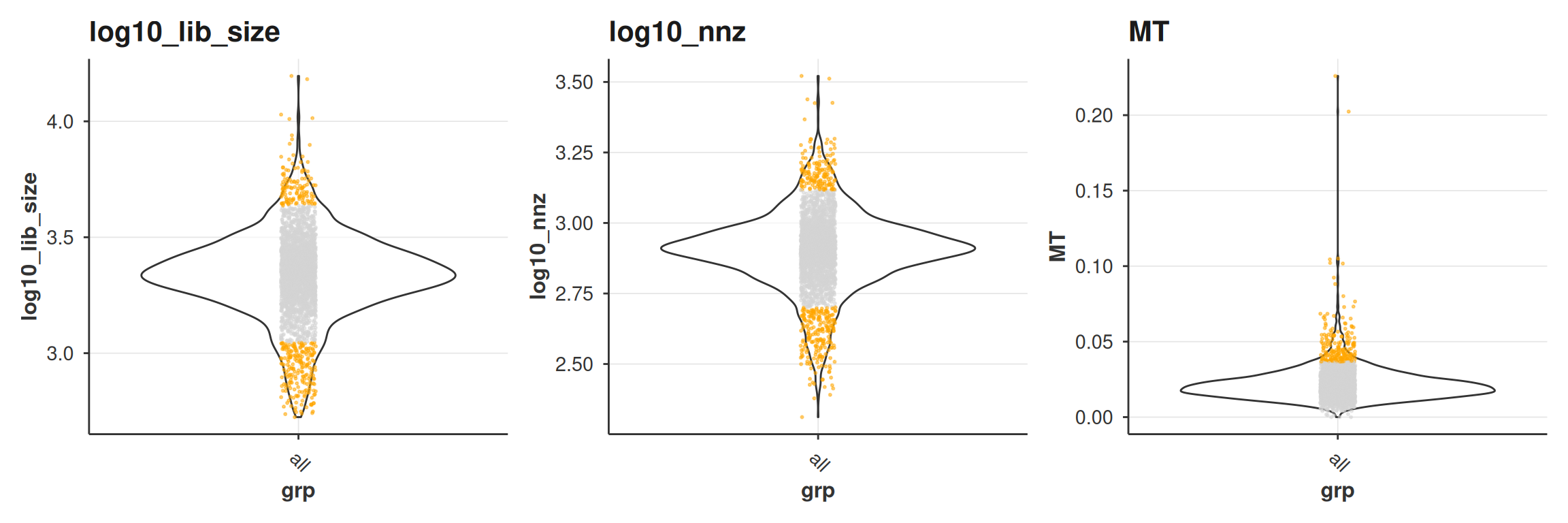
-
joint_plot_scmethod that compares the genes versus UMIs per cell.
joint_plot_sc(qc)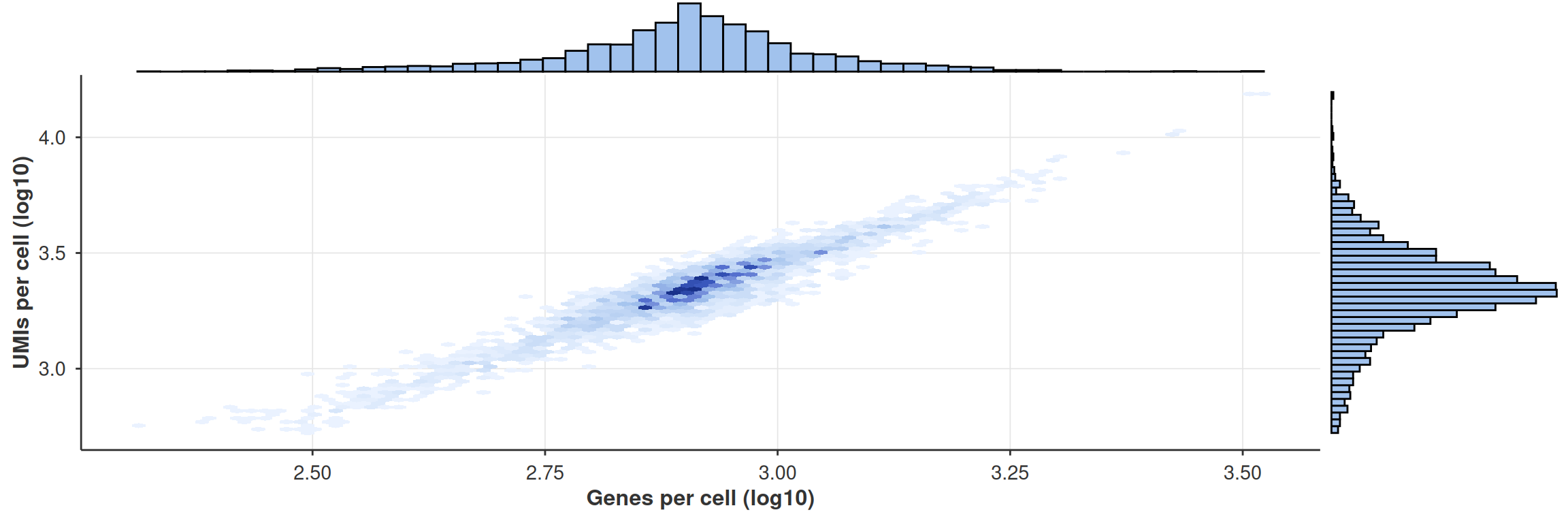
Filtering cells
We store the outlier flag in the obs table and then set the cells to keep. From this point on, all downstream methods (HVG selection, PCA, etc.) will only operate on the retained cells.
sc_object[["outlier"]] <- qc$combined

cells_to_keep <- qc_df[!qc$combined, cell_id]

sc_object <- set_cells_to_keep(sc_object, cells_to_keep)

sc_object
#> Single cell experiment (Single Cells).
#>   No cells (original): 2700
#>    To keep n: 2163
#>   No genes: 11139
#>   HVG calculated: FALSE
#>   PCA calculated: FALSE
#>   Other embeddings: none
#>   KNN generated: FALSE
#>   SNN generated: FALSE
#>   MAGIC imputed: none
#>   Residual model: none
#>   Stale artefacts: none
Feature selection, PCA and neighbours
With QC done, we move through the standard pipeline: highly variable gene selection, PCA, and nearest neighbour computation.
sc_object <- find_hvg_sc(
  object = sc_object,
  hvg_no = 2000L,
  .verbose = TRUE
)

sc_object <- calculate_pca_sc(
  object = sc_object,
  no_pcs = 30L,
  sparse_svd = TRUE
)
#> Using sparse SVD solving on scaled data on 2000 HVG.

# the data is so tiny that exhaustive kNN search is faster than building
# an approximate nearest neighbour index
sc_object <- find_neighbours_sc(
  object = sc_object,
  neighbours_params = params_sc_neighbours(
    knn = list(knn_method = "exhaustive")
  )
)
#>
#> Generating sNN graph (full: TRUE).
#> Transforming sNN data to igraph.
Clustering and marker detection
Leiden clustering
Leiden clustering followed by differential gene expression across all clusters. You can also run Louvain if you want, but Leiden is thought of to have better properties, see Traag, et al..
sc_object <- find_clusters_sc(sc_object, res = 1, name = "leiden_clusters")

all_markers <- find_all_markers_sc(
  object = sc_object,
  column_of_interest = "leiden_clusters"
)
#> Processing group 1 out of 7.
#> Processing group 2 out of 7.
#> Processing group 3 out of 7.
#> Processing group 4 out of 7.
#> Processing group 5 out of 7.
#> Processing group 6 out of 7.
#> Processing group 7 out of 7.

all_markers[, gene_symbol := ensembl_to_symbol[gene_id]]

head(all_markers[fdr <= 0.05][order(-abs(lfc))])
#>      grp         gene_id      lfc     prop1     prop2 z_scores      p_values
#>    <int>          <char>    <num>     <num>     <num>    <num>         <num>
#> 1:     2 ENSG00000163220 4.160649 0.9859944 0.2004430 34.76254 4.479903e-265
#> 2:     4 ENSG00000105374 4.126296 0.9957627 0.2086144 30.80441 1.143719e-208
#> 3:     2 ENSG00000090382 4.056365 0.9971989 0.5105205 30.63871 1.868267e-206
#> 4:     2 ENSG00000143546 3.653863 0.9719888 0.1140642 37.42005 9.224141e-307
#> 5:     2 ENSG00000101439 3.427596 0.9971989 0.2375415 32.85327 5.113793e-237
#> 6:     3 ENSG00000204287 3.274704 1.0000000 0.4668083 27.17719 6.043250e-163
#>              fdr gene_symbol
#>            <num>      <char>
#> 1: 4.069544e-262      S100A9
#> 2: 7.197258e-206        NKG7
#> 3: 7.071390e-204         LYZ
#> 4: 2.094802e-303      S100A8
#> 5: 3.318121e-234        CST3
#> 6: 2.871215e-160     HLA-DRA
Fast clustering
In the case of large data sets there is an option to run an accelerated form of clustering. This runs first k-means clustering (with default sqrt(N) cells), then kNN on the centroids, followed by Louvain (Leiden is not yet supported, but on the to-do list) across a set of resolutions. There is also an option to run this across several seeds to check for stability of the clustering. If you ran the grid search, the membership
fast_cluster_res <- fast_cluster_sc(
  object = sc_object,
  resolutions = c(5, 3, 2, 1.5, 1, 0.5),
  # also return the k-mean clustering
  return_kmeans = TRUE,
  no_seeds = 25L,
  grid_search = TRUE
)

fast_clusted_dt <- get_data(fast_cluster_res)

head(fast_clusted_dt)
#>    cell_idx res_5 res_3 res_2 res_1.5 res_1 res_0.5
#>       <int> <int> <int> <int>   <int> <int>   <int>
#> 1:        1    13     2     0       0     0       0
#> 2:        3    14     3     0       0     0       0
#> 3:        4     1     4     3       3     1       1
#> 4:        6    16     3     0       0     0       0
#> 5:        8     4     3     0       0     0       0
#> 6:        9     4     3     0       0     0       0
If you want to explore the k-means memberships or centroids, there are getters for this.
centroids <- get_centroids_sc(fast_cluster_res)

kmeans_membership <- get_kmeans_clusters(fast_cluster_res)
You can add the data to the object via:
sc_object <- add_sc_new_obs(
  object = sc_object,
  obs_data = get_data(fast_cluster_res)
)

head(sc_object)
#>    cell_idx          cell_id   nnz lib_size to_keep          MT      Ribo
#>       <num>           <char> <num>    <num>  <lgcl>       <num>     <num>
#> 1:        1 AAACATACAACCAC-1   778     2418    TRUE 0.030190241 0.4371381
#> 2:        3 AAACATTGATCAGC-1  1126     3144    TRUE 0.008905852 0.3171120
#> 3:        4 AAACCGTGCTTCCG-1   953     2632    TRUE 0.017477203 0.2431611
#> 4:        6 AAACGCACTGGTAC-1   779     2154    TRUE 0.016713092 0.3635097
#> 5:        8 AAACGCTGGTTCTT-1   785     2255    TRUE 0.031042129 0.3844789
#> 6:        9 AAACGCTGTAGCCA-1   530     1273    TRUE 0.011783189 0.3794187
#>    outlier leiden_clusters res_5 res_3 res_2 res_1.5 res_1 res_0.5
#>     <lgcl>           <int> <int> <int> <int>   <int> <int>   <int>
#> 1:   FALSE               1    13     2     0       0     0       0
#> 2:   FALSE               1    14     3     0       0     0       0
#> 3:   FALSE               6     1     4     3       3     1       1
#> 4:   FALSE               1    16     3     0       0     0       0
#> 5:   FALSE               5     4     3     0       0     0       0
#> 6:   FALSE               5     4     3     0       0     0       0
Dimensionality reduction
Let us run quickly UMAP and tSNE.
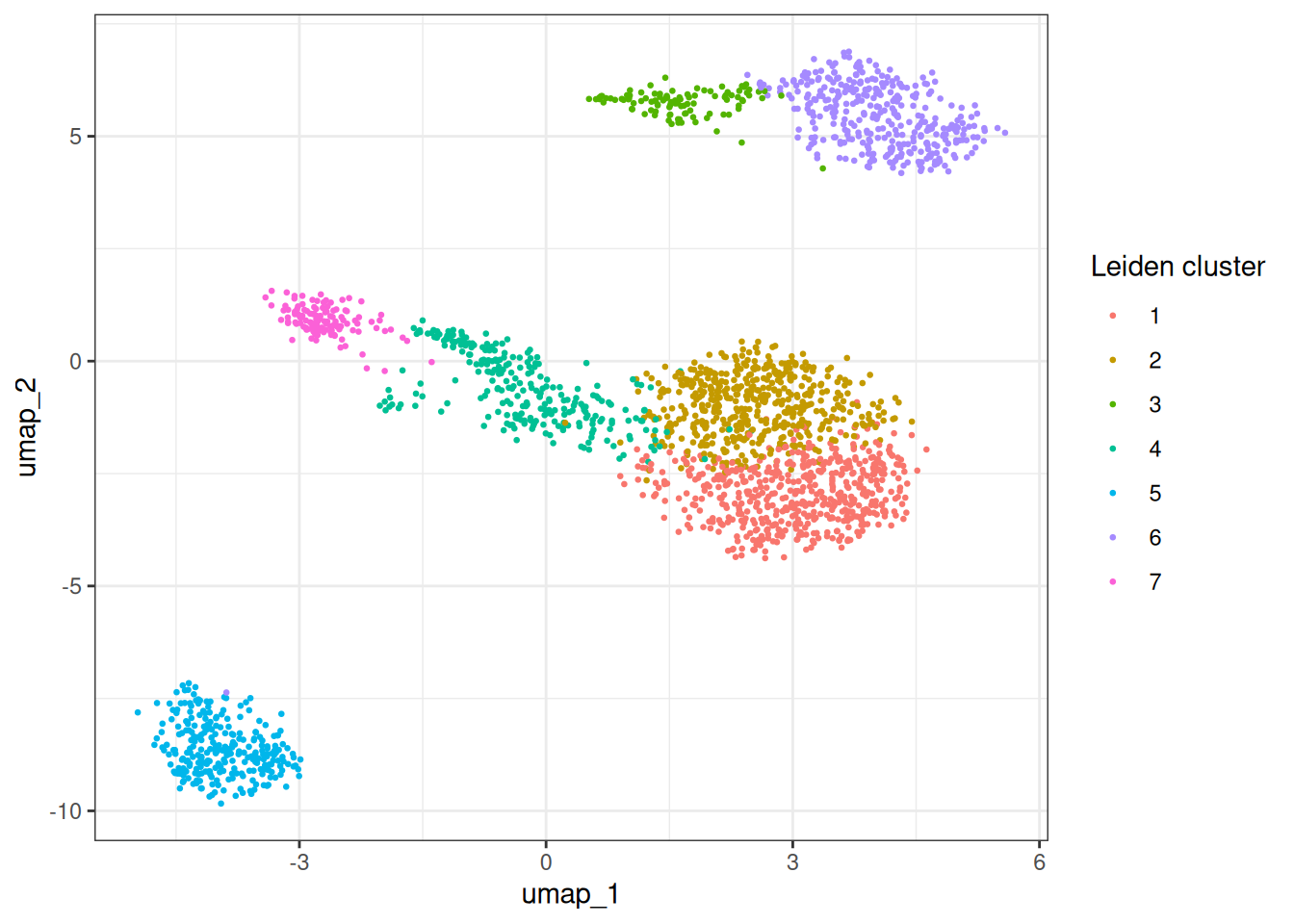
We can use bixverse.plots package which provides some basic plotting functions such as:
- Plotting the embedding using
embedding_plot_scto check out the UMAP embeddings:
embedding_plot_sc(
  sc_object,
  embedding = "umap",
  colour_by = "leiden_clusters",
  label_by = "leiden_clusters",
  discrete = TRUE
)
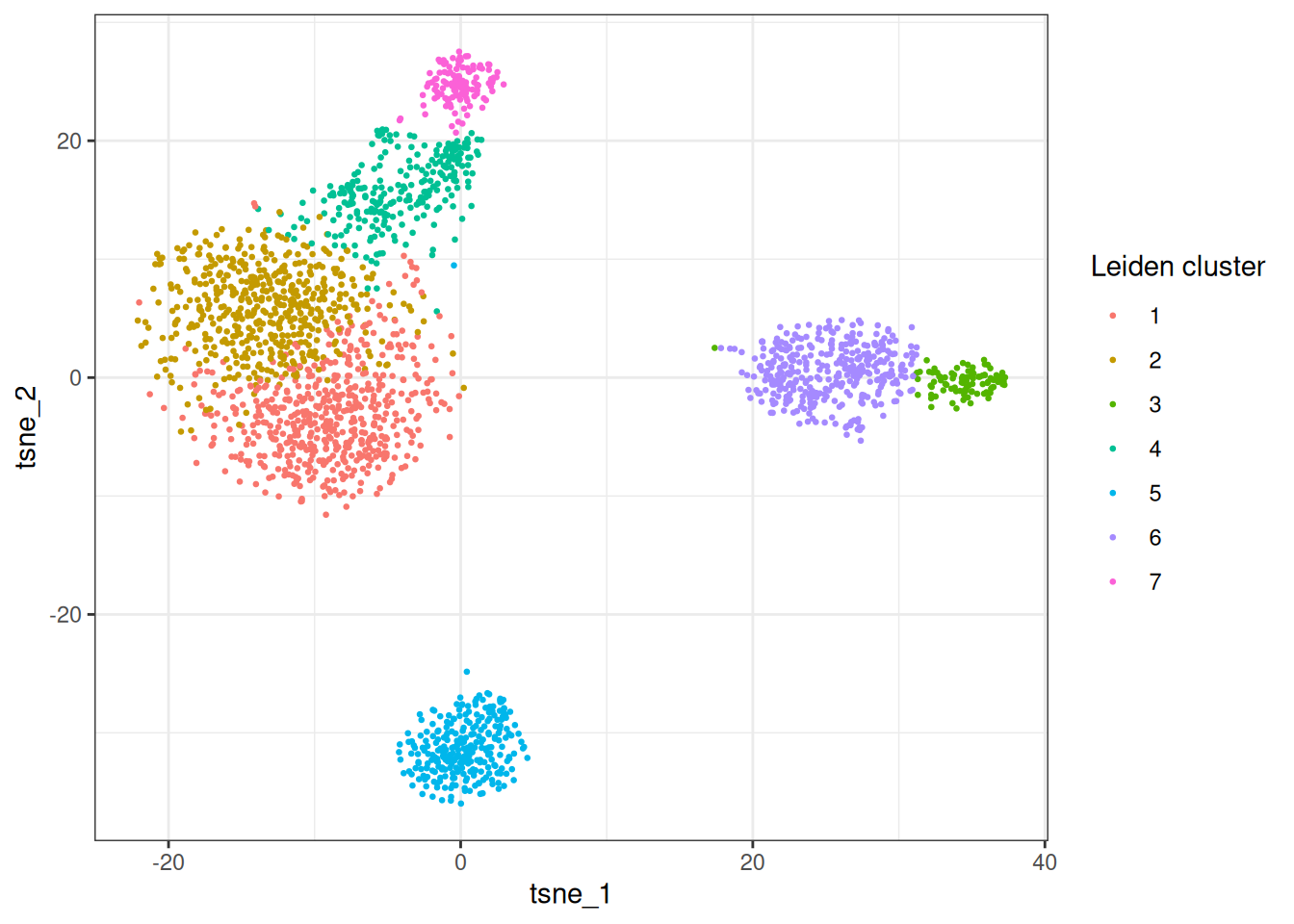
- Let’s check out tSNE
embedding_plot_sc(
  sc_object,
  embedding = "tsne",
  colour_by = "leiden_clusters",
  label_by = "leiden_clusters",
  discrete = TRUE
)
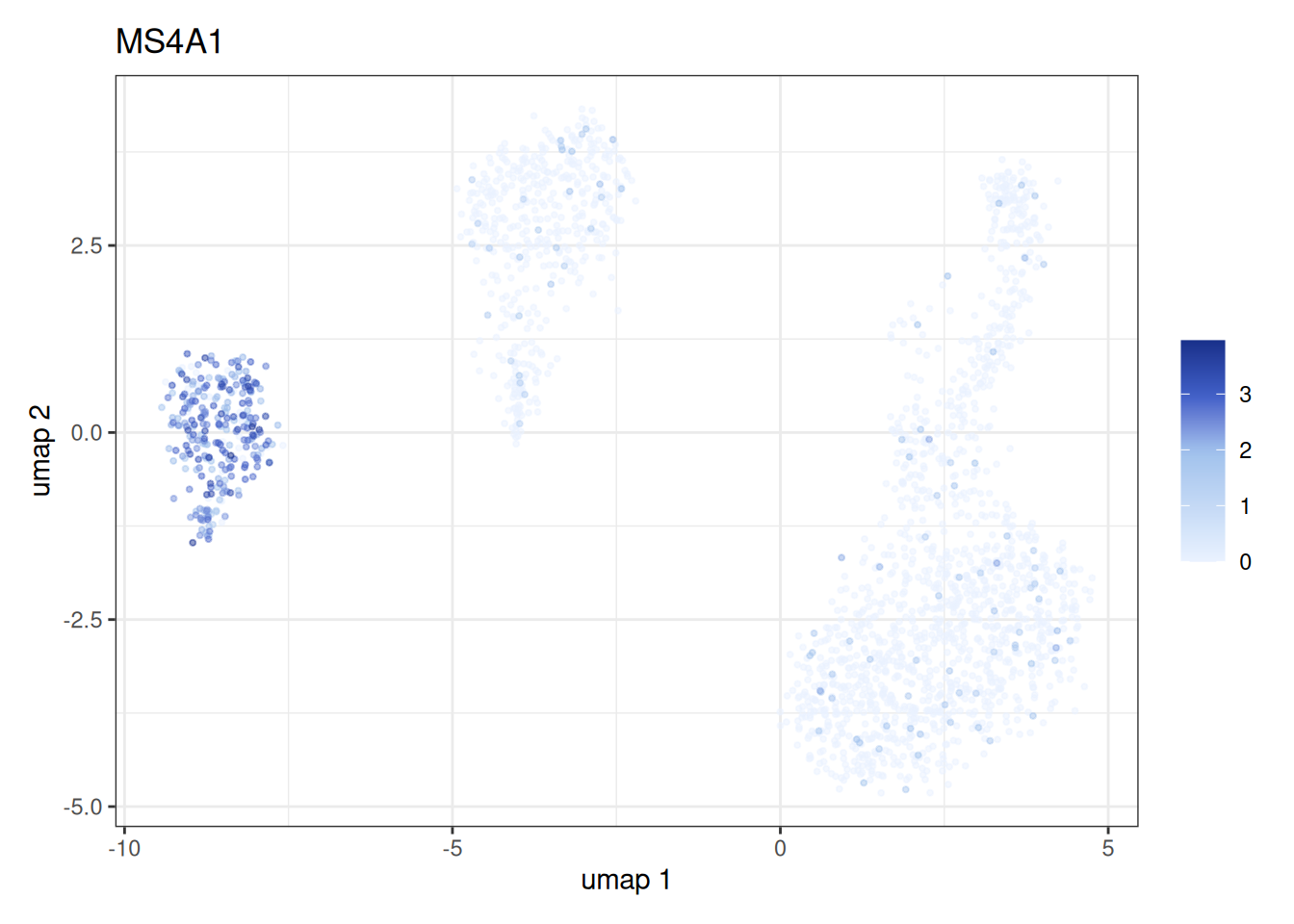
- We can also plot a gene expression on the embedding space using
feature_plot_sc:
feature_plot_sc(
  object = sc_object,
  features = "ENSG00000156738",
  feature_labels = c("ENSG00000156738" = "MS4A1"),
  embedding = "umap"
)
Cell type annotation
Define a set of marker genes to perform cell type annotation.
cell_markers <- c(
  CD3D = "T cells",
  CD3E = "T cells",
  CD3G = "T cells",
  IL7R = "CD4+ T",
  CD4 = "CD4+ T",
  CD8A = "CD8+ T",
  CD8B = "CD8+ T",
  MS4A1 = "B cells",
  CD79A = "B cells",
  CD19 = "B cells",
  CD14 = "CD14+ Mono",
  LYZ = "CD14+ Mono",
  S100A8 = "CD14+ Mono",
  FCGR3A = "CD16+ Mono",
  CDKN1C = "CD16+ Mono",
  GNLY = "NK",
  NKG7 = "NK",
  NCAM1 = "NK",
  FCER1A = "mDC",
  CD1C = "mDC",
  LILRA4 = "pDC",
  CLEC4C = "pDC",
  PPBP = "Platelet",
  PF4 = "Platelet"
)
Let’s annotate the PBMCs using the scType cell type annotation algorithm by Ianevski et al. (2022). We first prepare the cell type markers into the right format using prepare_cell_markers helper functions. Subsequently calculate the scType score using calc_sc_type_scores and summarise on cluster level to get the annotated cell type using score_clusters. Finally, we can assign back the cell type annotation into the sc_object.
cell_markers_dt <- stack(cell_markers) %>%
  as.data.table() %>%
  setnames(., c("values", "ind"), c("cell_type", "gene_symbol")) %>%
  .[, gene_symbol := as.character(gene_symbol)] %>%
  .[, gene_id := var$gene_id[match(gene_symbol, var$gene_symbol)]] %>%
  .[!is.na(gene_id), ]

## Prepare the list of markers
marker_list <- prepare_cell_markers(sc_object, cell_markers_dt)
## Calculate the score for each cell
sctype_scores <- calc_sc_type_scores(
  object = sc_object,
  cell_marker_list = marker_list
)
## Annotate the clusters
cell_type_anno <- score_clusters(
  sctype_scores,
  sc_object[[]][["leiden_clusters"]]
)
We can add the cell type annotation back into the sc_object.
obs <- get_sc_obs(sc_object, filtered = TRUE)[, .(
  cell_idx,
  leiden_clusters
)] %>%
  .[,
    sc_type := cell_type_anno$cell_type[match(
      leiden_clusters,
      cell_type_anno$cluster_id
    )]
  ]
sc_object[["sc_type"]] <- obs$sc_type
embedding_plot_sc(
  sc_object,
  embedding = "umap",
  colour_by = "sc_type",
  label_by = "sc_type",
  discrete = T
) +
  labs(color = "Cell type") +
  theme(legend.position = "bottom")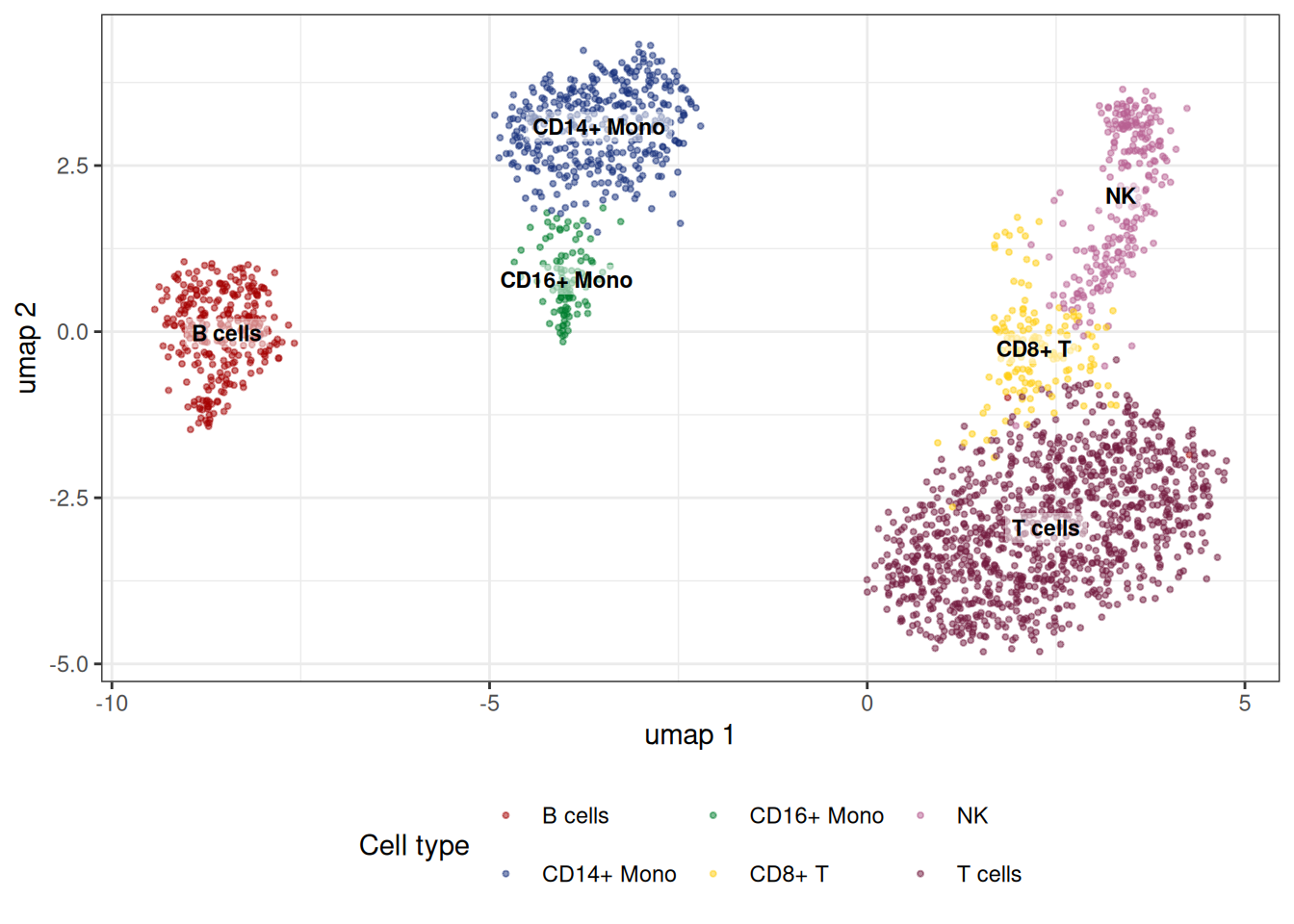
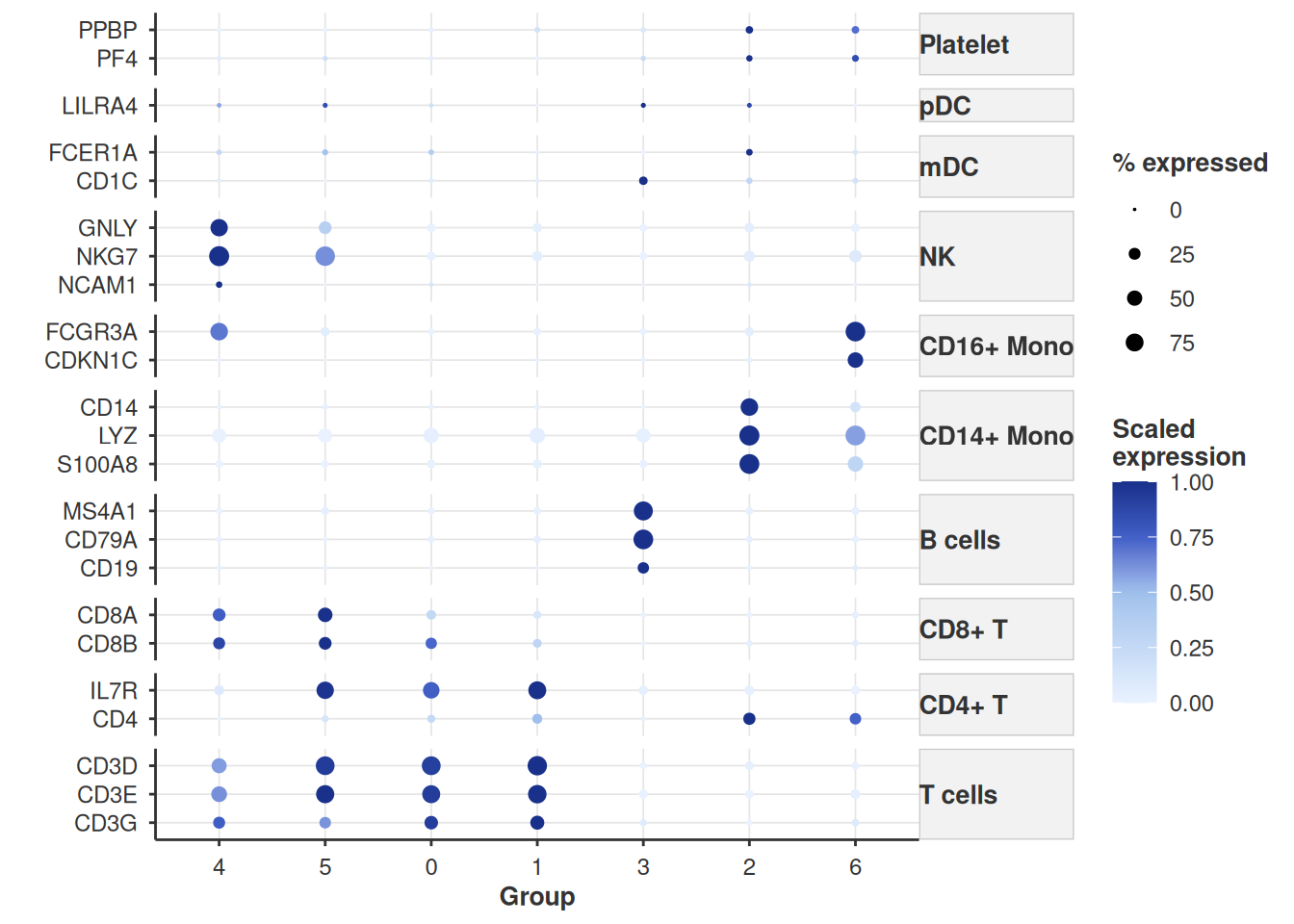
Alternatively, we can also show the expression levels of the cell type markers using the dotplot plotting function dot_plot_sc from bixverse.plots.
features_vec <- setdiff(symbol_to_ensembl[names(cell_markers)], NA)
feature_labels <- ensembl_to_symbol[features_vec]

dot_plot_sc(
  object = sc_object,
  features = features_vec,
  feature_labels = ensembl_to_symbol[features_vec],
  grouping_variable = "leiden_clusters",
  scale_exp = TRUE,
  feature_grouping = cell_markers,
  cluster_groups = T
)
Per-cell gene expression
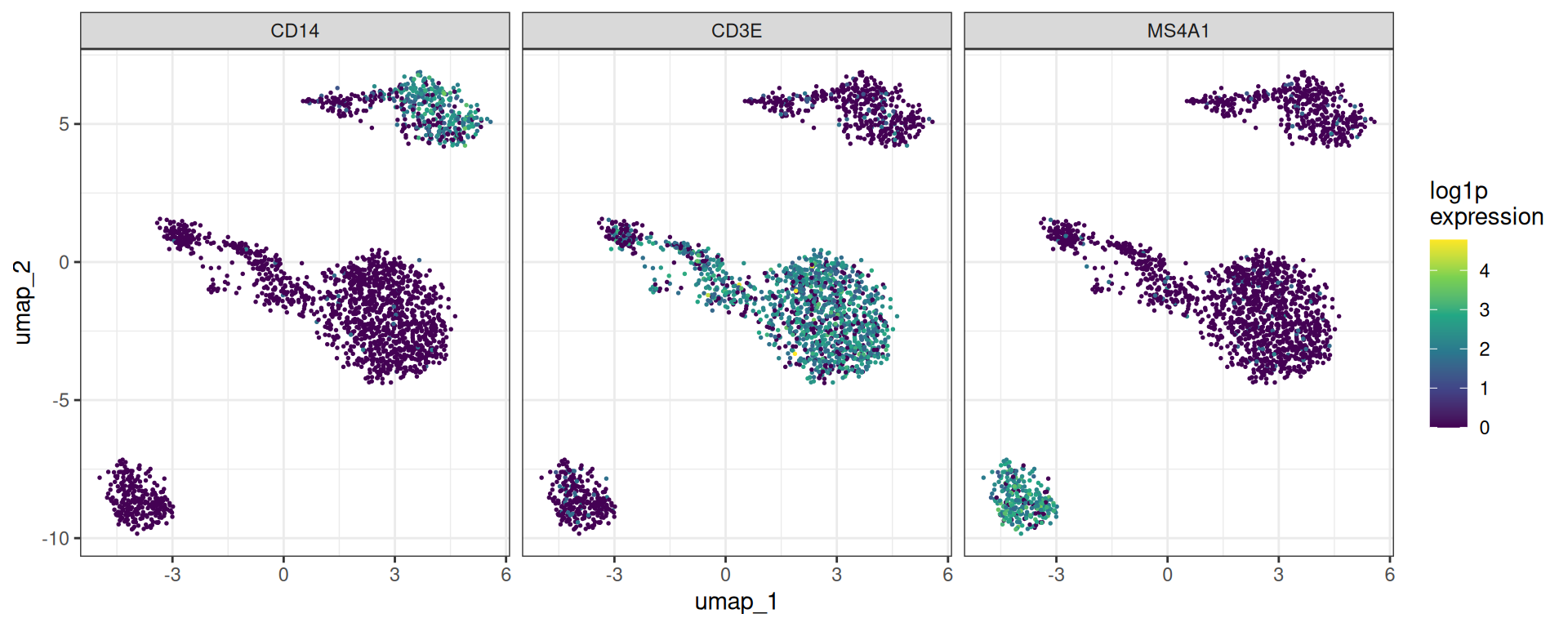
In addition to the feature plot (feature_plot_sc), we can also represent the gene expression using a violin plot
features <- symbol_to_ensembl[c(
  "CD3D",
  "IL7R",
  "CD8A",
  "MS4A1"
)]
feature_labels <- setNames(names(features), nm = features)
stacked_violin_plot_sc(
  sc_object,
  features = features,
  feature_labels = feature_labels,
  grouping_variable = "leiden_clusters"
)
Clean up
unlink(tempdir_pbmc, recursive = TRUE, force = TRUE)